

Listing Performance Insights helps you understand how your listing is performing and how property seekers interact with it. You can review your listing’s visibility, views, engagement, leads and Ad Credit usage, then use these insights to identify where improvements may be needed.
Where can you find Listing Performance Insights?
You can access Listing Performance Insights from your listings in AgentPro:
- Log in to AgentPro.
- Go to Listing.
- Find the listing you want to review.
- Check My Listing Performance for a quick overview of Leads, Views, Impressions and Favourite.
- Select See Details > to open the detailed Listing Performance Insights page.
What does your performance score mean?
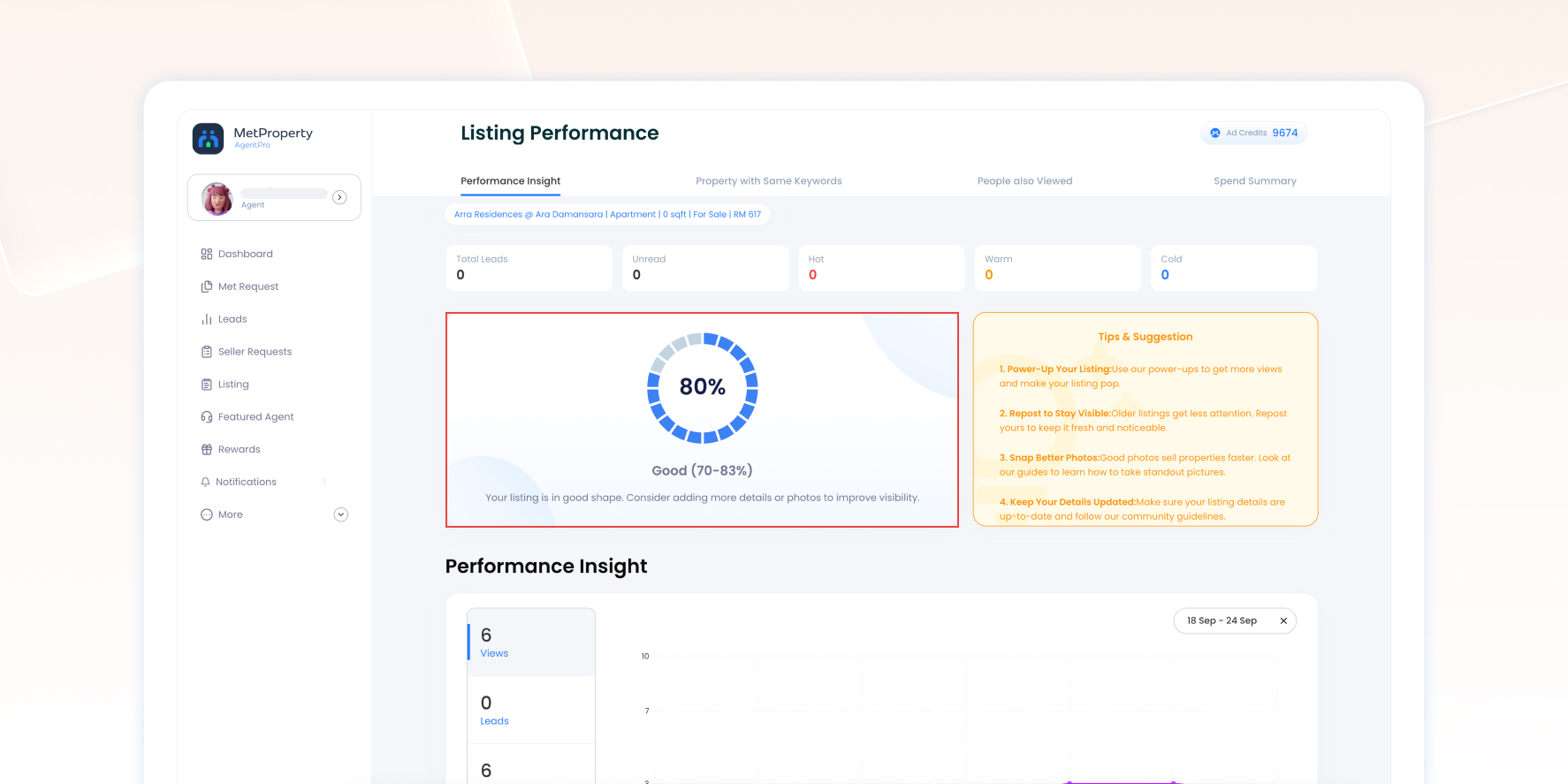
Your performance score gives you a quick indication of the overall condition of your listing. The page also shows a status and suggestions that may help you improve it.
Review the score together with your Views, Impressions, Leads and Engagements to get a more complete picture of your listing.
What do the performance metrics mean?
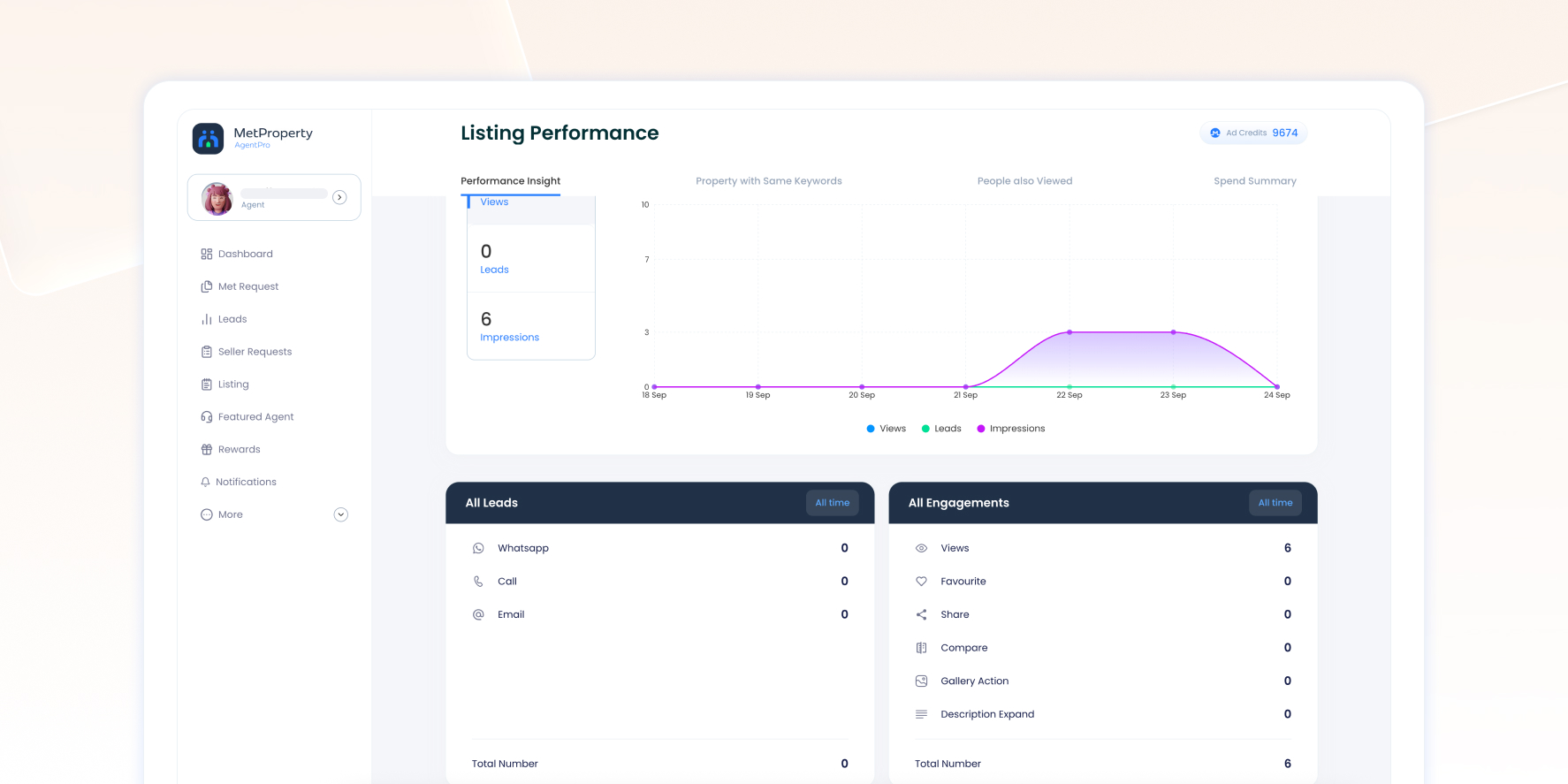
- Impressions – how many times your listing is shown to property seekers.
- Views – how many times your listing is viewed.
- Leads – contact actions through WhatsApp, Call and Email.
- Engagements – interactions with your listing, including Views, Favourite, Share, Compare, Gallery Action and Description Expand.
The lead summary at the top of the page also shows Total Leads, Unread, Hot, Warm and Cold.
How should you interpret your listing performance?
Look at your performance metrics together to understand how property seekers are responding to your listing and where it may need attention.
High impressions but low views
Your listing is appearing to property seekers, but fewer are opening it. Review your main photo, price and key listing information to see what could be improved.
High views but low leads
Property seekers are opening your listing but taking fewer contact actions. Review your photos, description, property details and other information that may influence their decision to enquire.
Low impressions and low views
Your listing is receiving limited exposure and may need more visibility.
Engagement but few leads
Property seekers are interacting with your listing but are not progressing to a contact action. Review the listing as a whole to identify information that could be clearer, more complete or more relevant to interested property seekers.
Once you identify where your listing may need attention, check Tips & Suggestions for actions you can take to improve it.
Learn how to improve your listing visibility and get your property in front of more potential buyers with our Improve Listing Visibility Guide.
How can you review other properties?
The detailed page includes two sections that provide additional property context:
- Property with Same Keyword – shows other properties associated with the same keyword.
- People also Viewed – shows other properties that you can review for additional context.
Use these sections as reference points when reviewing factors such as pricing, photos and listing presentation.
How can you improve your listing performance?
Review Tips & Suggestion for actions that may help improve your listing. Depending on your listing, you may be prompted to:
- Use a suitable PowerUp for additional visibility or promotional benefits.
- Use Repost to refresh your listing’s posting date and ranking, and extend its expiry by another 60 days.
- Improve your property photos.
- Keep your listing details accurate and up to date.
After taking action, continue monitoring your Views, Impressions, Engagements and Leads to see how your listing performs.
How can you check your Ad Credit usage?
Go to Spend Summary to review the Ad Credits used for a specific listing and the results generated from those credits. You can check:
- Total Credit Used
- View Per Credit
- Lead Per Credit
- Impression Per Credit
Use these metrics to understand how the listing is performing in relation to the Ad Credits spent on it.
For a detailed breakdown, check Item Spending to see the Date, Action, Type and Credit Used for activities on the listing, such as posting, Repost, Boost and Enhance.
Frequently Asked Questions
What should I do if my listing is getting views but few leads?
Review your listing information and Tips & Suggestion for areas you may be able to improve. Continue monitoring your Views, Engagements and Leads after making changes.
Does Favourite count as a lead?
No. Favourite is an engagement action. Leads are tracked separately through WhatsApp, Call and Email.
When should I review my Listing Performance Insights?
Review your Listing Performance Insights when you want to check your listing’s results, especially after updating your listing, using Repost or applying a PowerUp. Monitor multiple metrics to get a more complete view of its performance.

